TLDR
- Project collaboration breaks when ownership is unclear.
- Updates get lost when they live in chats, not tasks.
- The right tool makes progress visible without constant status calls.
- WhitePanther is built for coordinated project execution across teams.
- Asana fits structured planning and cross-team clarity.
- ClickUp works best if you want deep customization.
- monday.com is strong for visual workflows and automation.
- Trello is best for simple Kanban projects and quick adoption.
- Jira is the go-to for agile software teams.
- Notion is great when docs and project tracking must live together.
- Wrike suits approval-heavy marketing and operations workflows.
- Smartsheet and Teamwork are strong for ops tracking and client-service delivery.
If your projects feel “mostly under control” until the last 48 hours before a deadline, you’re not alone. Most startups and SMBs struggle with the same mess: unclear ownership, missing updates, files scattered across places, and decisions stuck in random chats. That’s exactly where Project Collaboration Software earns its keep. It gives your team one shared place to plan work, talk about work, and actually finish work without playing detective.
76% even believe that they are more efficient when they use tools for managing projects and collaborating.
And in this article, we are going to break down everything for you. From what is project collaboration software to which software is best suited for you based on your use case.
So, lets start
What is project collaboration software?
At its core, Project Collaboration Software is a system that helps multiple people coordinate on the same project in real time. It’s where tasks live, owners are visible, deadlines are clear, conversations stay attached to the work, and progress is trackable.
It’s not “nice-to-have.” It’s a way to reduce the most common collaboration failures: people forgetting handoffs, two people doing the same thing, approvals getting lost, and leadership asking for status because nobody can see what’s going on.
Why you should use a project collaboration software?
Here’s the reality. When you don’t use Project Collaboration Software, you still “manage projects” but you do it using memory, DMs, and panic. That works for a tiny team for a short time. Then it breaks.
A solid tool helps you:
- Assign ownership so tasks stop floating around
- Reduce back-and-forth by keeping context inside the task
- Track deadlines and dependencies so surprises reduce
- Make progress visible so “status meetings” shrink
- Keep files, links, and decisions connected to the work
With vs without: what changes?
This is what Project Collaboration Software typically fixes in day-to-day execution.
| Factor | Without a collaboration tool | With a collaboration tool |
| Ownership | “Someone will do it” | Clear assignee per task |
| Updates | Status asked repeatedly | Updates live on the task |
| Deadlines | Reminders in chats | Due dates, alerts, timelines |
| Handoffs | Dropped or delayed | Dependencies and checklists |
| Files | Multiple versions everywhere | Attachments stay with work |
| Decisions | Buried in messages | Logged in comments and threads |
| Visibility | Leaders chase progress | Dashboards and project views |
| Onboarding | Slow, lots of explaining | New people read the project history |
Top 12 Project collaboration software for Startups & SMBs
Below are 12 strong Project Collaboration Software options. We have focused on real project collaboration needs: clarity, handoffs, updates, and keeping teams aligned.
| Tool | Best for | Pros | Cons |
| WhitePanther | Startups + SMBs that want tight execution across tasks, comms, files, and follow-ups | Project work + communication in one flowGood for cross-functional coordinationBuilt-in time tracking, calls/meetings, storage integrations | Newer product, less reviews on public platforms |
| Asana | Teams that want structured project planning and clear ownership (ops, marketing, product) | Clean task structure and timelinesStrong visibility for stakeholdersGood for cross-team coordination | Can feel rigid for highly custom workflows Advanced reporting/automation often needs higher plans |
| ClickUp | Teams that want one tool they can customize heavily | Very flexible views and setupsDocs + tasks in one placePowerful dashboards | Easy to overbuild a messy setupLearning curve if you use it “fully” |
| monday.com | Ops-heavy teams that like visual workflows and automations | Strong workflow building + automationsGreat at tracking repeatable processesNice stakeholder dashboards | Can get expensive as you scale seats/featuresSome setups become “board sprawl” fast |
| Trello | Small teams needing simple Kanban collaboration | Fast to adoptSimple visual workflowGreat for lightweight projects | Weak for complex dependencies/timelinesGrows messy at scale without discipline |
| Jira | Software/product teams running agile delivery | Best-in-class for sprints/backlogsStrong issue tracking + workflowsGreat for engineering visibility | Overkill for non-tech teamsAdmin/config complexity if not set up well |
| Notion | Teams that want project tracking + docs/wiki together | Flexible docs + databasesGreat for knowledge + planningHighly customizable | Can become inconsistent without standardsTask execution features can feel lighter than dedicated PM tools |
| Basecamp | Teams that want straightforward collaboration without complexity | Simple to useClear project communication spacesGood for async updates | Limited advanced PM features (dependencies, deep reporting)Not ideal for complex multi-team delivery |
| Wrike | Marketing/creative/ops teams needing approvals + structured workflows | Strong workflow controlApprovals/proofing optionsSolid reporting for delivery tracking | Setup can feel heavyBest experience often requires process maturity |
| Smartsheet | Spreadsheet-minded teams managing ops projects and portfolios | Familiar grid-style planningGood dashboards and reportingStrong for operational tracking | Feels less “collab-native” than chat-first toolsCan become complex like a spreadsheet monster |
| Teamwork | Agencies and client-services teams managing multiple projects | Great for client workTime tracking fits services deliveryGood project visibility across accounts | Some features can feel “services-first” if you’re a product teamNeeds consistent usage to avoid chaos |
| Zoho Projects | SMBs wanting a solid, practical PM tool (often in a Zoho stack) | Good core PM features (tasks, dependencies, Gantt)Value-friendly for many SMBsWorks well in Zoho ecosystem | UI/UX can feel less polished than premium toolsBest experience if you’re already using Zoho apps |
1) WhitePanther
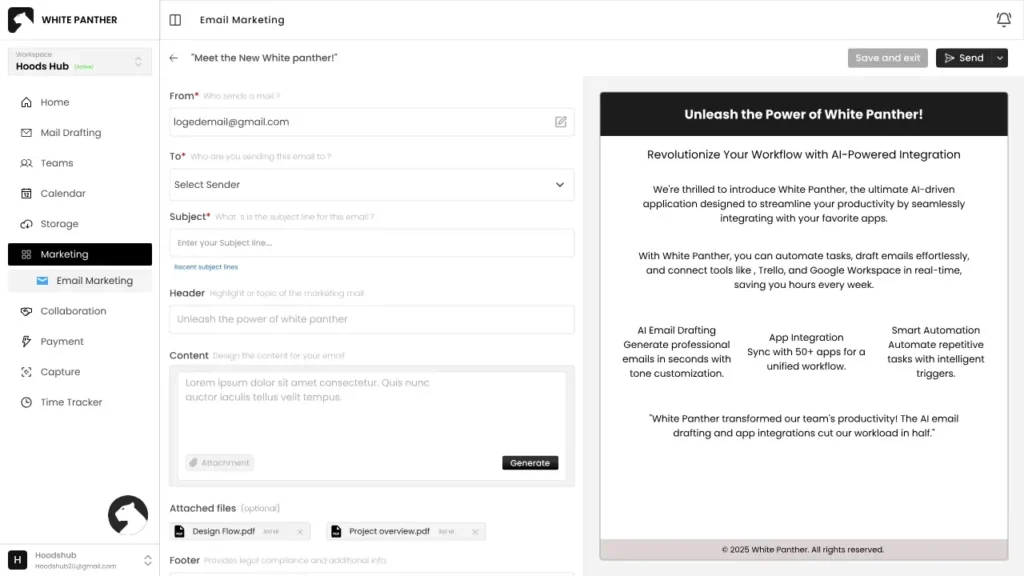
WhitePanther is built for teams that want project execution to feel smoother, especially when work involves coordination across tasks, communication, files, and follow-ups. It’s positioned as a collaborative workspace where your team can manage projects and stay aligned without losing context.
Key features
- Task management for assigning and tracking work
- Built-in email drafting and management to handle client and stakeholder updates
- Meetings and calls support for coordination around project work
- Time tracking to understand effort and delivery load
- Cloud storage integrations (Google Drive and Dropbox) to keep files accessible inside workflows
- Screen recording for quick async handoffs and explanations
2) Asana
Asana is great when you want structured projects with clear ownership, timelines, and repeatable workflows. It’s commonly used by marketing, operations, product, and cross-functional teams.
Key features
- Tasks, subtasks, and assignees for clear responsibility
- Multiple project views (list, board, timeline) for planning and execution
- Workflow rules and automation to reduce manual updates
- Reporting and visibility for project progress
- Comments and updates that stay tied to tasks
3) ClickUp
ClickUp is a flexible option if your team wants a lot of customization. It works well when different teams need different views of the same work.
Key features
- Task hierarchy for breaking down complex work
- Docs connected to tasks for specs, notes, and SOPs
- Multiple views for teams that plan differently
- Dashboards for tracking progress and workload
- Real-time collaboration features like comments and mentions
4) monday.com
monday.com fits teams that want visual project tracking with strong workflow building. It’s often used by operations, marketing, and client services teams that need repeatable processes.
Key features
- Boards for tracking tasks and projects
- Automations for reminders, status changes, and handoffs
- Dashboards for high-level visibility
- Integrations to connect other business workflows
- Views like Kanban and Gantt-style planning (plan dependent)
5) Trello
Trello is simple, fast, and easy to adopt. It’s strong for lightweight project collaboration and teams that like Kanban-style workflow.
Key features
- Boards, lists, and cards to track work visually
- Checklists for subtasks and completion
- Comments and mentions for collaboration
- Power-Ups to extend functionality (calendar, integrations, automation)
- Flexible setup for different workflows
6) Jira
Jira is built for software teams and anyone running agile workflows. It’s the go-to when you need sprints, backlogs, and structured tracking for delivery.
Key features
- Scrum and Kanban boards for execution
- Backlogs for prioritization and planning
- Sprint planning and tracking
- Issue types and workflows for structured work
- Collaboration around tickets via comments and mentions
7) Notion
Notion works well for teams that want project tracking mixed with documentation. It shines when your project collaboration depends on knowledge sharing and lightweight task systems.
Key features
- Project databases with custom properties
- Board views for task workflows
- Team docs and wiki-style documentation
- Automations to reduce repetitive updates (workspace dependent)
- Flexible templates for different team setups
8) Basecamp
Basecamp is best for teams who want straightforward collaboration without a heavy setup. It focuses on communication clarity and keeping project conversations organized.
Key features
- To-dos and simple task assignment
- Message boards for structured discussions
- Schedule for events and dated work
- File storage inside projects
- Check-ins and recurring updates (workflow dependent)
9) Wrike
Wrike is strong for teams that need more formal project control, especially marketing, creative, and operations teams that work with approvals and multiple stakeholders.
Key features
- Multiple project views (board, table, Gantt, calendar)
- Task management with structured workflows
- Proofing and approvals for review cycles
- Reporting for delivery tracking
- Collaboration features built around work items
10) Smartsheet
Smartsheet is ideal if your team thinks in spreadsheets but still needs real project coordination. It’s popular for operations-heavy work and PMO-style tracking.
Key features
- Grid-style task and milestone tracking
- Workflow automation for reminders and routing
- Dashboards and reporting for stakeholders
- Resource visibility and capacity tracking (plan dependent)
- Collaboration and sharing across teams
11) Teamwork
Teamwork is built for client services teams, agencies, and SMBs that run multiple projects with profitability and time tracking in mind.
Key features
- Task management and project planning
- Time tracking baked into workflows
- Client collaboration controls (visibility depends on setup)
- Resource and workload planning (plan dependent)
- Reporting for delivery and utilization
12) Zoho Projects
Zoho Projects is a practical option for SMBs that want a full project toolkit with task structure, dependencies, and time management.
Key features
- Task management with dependencies and Kanban view
- Gantt charts for planning and critical path visibility
- Time tracking and timesheets (useful for services teams)
- Collaboration features like comments and notifications
- Integrations with common business tools (including file tools)
Which project collaboration tool is best for you(Based on your usecase)?
| Your use case | Best tools | Why this fits |
| You run cross-functional projects and coordination is the real pain | WhitePanther, Asana, monday.com | Strong day-to-day execution with clear owners, updates, and accountability |
| You want clean task ownership, timelines, and predictable delivery | Asana, Wrike, Zoho Projects | Great structure for planning, due dates, and progress tracking |
| You want maximum flexibility and custom workflows | ClickUp, Notion, monday.com | Works when different teams need different views of the same work |
| You need approvals and review cycles (creative, marketing, ops) | Wrike, monday.com, Asana | Smooth handling of review, sign-offs, and stakeholder visibility |
| You want simple Kanban and fast adoption for a small team | Trello, Basecamp | Lightweight setup, easy to start and keep moving |
| You build software with sprints, backlogs, and releases | Jira, ClickUp | Built for agile planning and engineering workflows |
| You want docs + tasks together (wiki + projects) | Notion, ClickUp | Strong for specs, SOPs, and project notes tied to execution |
| You manage operations like a spreadsheet but need collaboration | Smartsheet, Zoho Projects | Great for structured tracking, dashboards, and operational projects |
| You run an agency or client delivery team | Teamwork, Asana, monday.com | Client projects need timelines, accountability, and time tracking |
| You already use Zoho apps and want a practical PM stack | Zoho Projects, monday.com | Integrates well into SMB workflows and handles core PM needs |
Conclusion
Picking Project Collaboration Software is less about chasing the “most popular tool” and more about matching how your team actually works. If your biggest pain is missed handoffs and unclear ownership, prioritize strong task structure and visibility. If your pain is approvals and stakeholder churn, prioritize review workflows and reporting. If your pain is messy execution across many small projects, prioritize simplicity and adoption.
And one final thing: whatever you choose, commit to it. A half-used Project Collaboration Software setup is just a prettier version of chaos. Use it daily, keep work inside it, and you’ll feel the difference within a couple of weeks.
Common Queries
1.What is Project Collaboration Software used for?
Project Collaboration Software helps teams plan, assign, and track work in one shared system. It keeps tasks, updates, files, and decisions connected so projects move forward without constant follow-ups.
2.How do I choose the right tool for my startup or SMB?
Start with your biggest collaboration pain. If it’s missed handoffs, pick strong task ownership and dependencies. If it’s approvals, pick proofing and workflow controls. If it’s adoption, pick the simplest tool your team will actually use daily.
3.Is Trello enough for a small team?
Yes, if your work is simple and mostly Kanban-based. The moment you need dependencies, timelines, workload planning, or reporting, Trello can start feeling limited unless you add lots of extensions and strict rules.
4.Which tools are best for software development teams?
WhitePanther is the strongest for agile teams that run sprints, backlogs, and issue workflows. ClickUp can also work for engineering teams that want more flexibility, but Jira usually wins for structured product delivery.
5.What mistakes make collaboration tools fail inside companies?
Two big ones: people keep working in chats and spreadsheets, and the tool becomes “optional.” The fix is simple: tasks, updates, and decisions must live inside the tool, or your system turns into a graveyard.

